Lumo AI
Meet Lumo, the AI copilot built for teaching with video
Lumo is Annoto's AI copilot, and it was purpose-built for education — not a general chatbot wearing an academic costume. It works where your courses work, grounded in the actual video content and course activity, and it exists to do one thing: take the repetitive weight out of teaching with video so instructors can spend their attention on students. Here is what that means in practice.
Quizzes and prompts, drafted in minutes
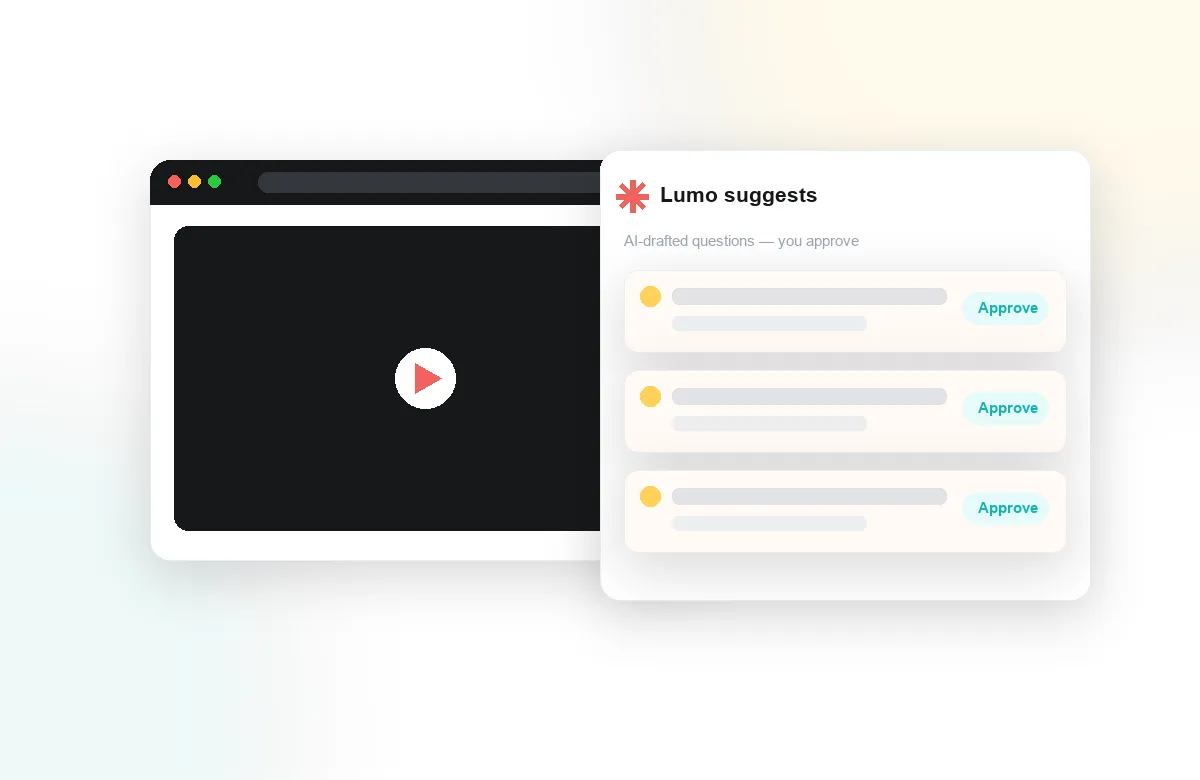
Writing good in-video questions is slow, careful work multiplied across every video in every course. Lumo drafts in-video quizzes and reflection prompts from the video itself, anchored to the moments where they belong, so an instructor's job shifts from authoring to editing. The instructor reviews, adjusts, and approves — Lumo accelerates pedagogical judgment, it never replaces it.
Summaries that turn watching into studying
Lumo powers notes and AI summaries, condensing lectures into structured, reviewable material students can return to before an exam or while completing an assignment. Instead of scrubbing through an hour of video hunting for one explanation, learners get a map of what the video covered and where — and their own time-anchored notes sit alongside it.
Insight instructors can act on
Lumo also works the analytical side, helping surface what attention and comprehension analytics reveal: where a cohort rewatched, where quiz results dipped, which discussions signal confusion rather than curiosity. Combined with the activity feed and completion and gradebook sync, that turns course video into an early-warning system — instructors find out what is not landing while the course is still running.
Because Lumo lives inside Annoto, everything it does flows through the classroom infrastructure institutions already trust: inside Canvas, Moodle, Blackboard, Brightspace, and Open edX via LTI 1.3, on top of Kaltura, Panopto, Wistia, YouTube, and Vimeo. Institutions worldwide use Annoto today, and Lumo is how their video courses get faster to build and easier to understand — without asking anyone to leave the course or learn a new tool. See the walkthrough below, or read the technical details at docs.annoto.net.
Human in the loop, by design
The design rule behind Lumo is simple: it produces drafts, and people make decisions. Nothing Lumo generates reaches students until an instructor has reviewed and approved it — not a quiz question, not a prompt, not a summary posted to a course. That review step is not friction to be engineered away; it is where an instructor's knowledge of this cohort, this syllabus, and this week's teaching goal gets applied. Lumo's job is to make that judgment cheap to exercise by removing the blank-page work that used to precede it.
The rule holds even as the assistance gets more capable. An instructor who accepts most of Lumo's suggestions in week one is still the author of record in week twelve, because every accepted item carries their edits, their emphasis, and their standards. Courses keep the instructor's voice — which is exactly what students respond to.
The drafting workflow, step by step
In practice, an instructor opens a video and asks Lumo for question candidates. Each candidate arrives anchored to the timestamp it tests, with a stem, answer options, and an indication of what part of the video justifies the correct answer. The instructor's work is editorial: tighten a stem, swap a distractor that gives the answer away, move a question so it lands after the explanation rather than during it, delete what does not fit. A pass over a full lecture typically takes a fraction of the time authoring from scratch would, which is what makes coverage realistic — not one heroic quiz in week three, but steady checkpoints across every video in the course.
What separates a usable draft from a good question
Lumo's question drafts are built around how memory actually works. Questions favor retrieval over recognition where the material allows it, distractors are drawn from plausible misreadings of the video rather than random wrong answers, and placement matters as much as wording — a question a few minutes after a concept forces recall, while one immediately after it merely checks attention. Instructors who want to go deeper can pair the drafts with the discussion history: when last term's students argued about a segment, that argument is usually the best source for this term's distractors.
Summaries across the study cycle
For students, AI summaries change when video gets used, not just how. Before an exam, a summary turns eight lectures into a reviewable outline with links back to the exact minutes worth rewatching. A student returning from illness catches up on the structure of what they missed before spending their limited time on the hardest segments. Students working in a second language use summaries to confirm they parsed a fast-spoken passage correctly. Instructors, meanwhile, read summaries of their own discussions to find what the class is stuck on without reading every thread — and often lift the recurring questions straight into next week's teaching.
From charts to a to-do list
Analytics only help if someone has time to interpret them, and that is the gap Lumo closes on the insight side. Rather than leaving an instructor with dashboards, it surfaces plain-language observations ordered by importance: this segment was rewatched far more than the rest, this question's results disagree with the discussion under it, this group has stopped engaging. Each observation links to the evidence behind it, so the instructor can verify in one click and act in the next — a reply, a clarification pinned to a timestamp, a note to revisit the topic in the live session.
The same triage works one level up. A program lead reviewing several course sections can ask where the pattern differs — which section's learners are engaging with the material and which are merely completing it — and take the underlying data out through the analytics export when a curriculum committee wants the full picture rather than the headline.
What Lumo deliberately does not do
Boundaries are part of the product. Lumo does not grade students autonomously; assessment settings, scoring, and gradebook consequences stay under instructor control. It does not roam the open internet for answers during coursework; it is grounded in the course's own videos, discussions, and activity, which is why its output stays relevant to what was actually taught. And it does not message students on an instructor's behalf without review. Institutions evaluating AI tools usually arrive with a checklist of things they need an assistant not to do — Lumo was built by starting from that checklist.
A sensible first month
Teams adopting Lumo get the best results by starting narrow. Pick one course and one video, generate a quiz draft, and time how long the review takes compared to writing from zero — that comparison usually settles the value question quickly. Then turn on summaries for the same course and watch how students use them around the first assessment. By the end of a month there is enough local evidence to decide where Lumo helps most in your context, and the attention and comprehension data to show colleagues rather than tell them. The walkthrough below shows each of these steps on screen, and docs.annoto.net covers enablement and configuration in detail.