Asynchronous Presentation Assignments: Options and a Simpler Workflow

What are the options for an asynchronous presentation assignment, where students record a talk and classmates respond on their own schedule? Campus guides converge on four: a dedicated tool like VoiceThread or GoReact, a Zoom or screen recording posted to an LMS discussion, the campus video platform with comments in a forum, or a video assignment feature that keeps the recording in the LMS and puts peer and instructor feedback at timestamps. They differ in where comments land, how much setup students carry, and how grading flows. This post compares them using Clarkson's and BYU's published options, then describes a simpler workflow with a rubric.
The options campus guides list
Clarkson University's asynchronous presentation options page, written for Moodle, is unusually candid about trade offs. Its first option is Echo360 video shared in a Moodle forum or assignment, with replies in text or in audio and video through Echo. Pros: it works inside forums and assignments, supports email subscriptions and is easy to grade. Cons, in Clarkson's words: "comments aren't attached to the video itself," and slides have to be converted to MP4 first. The second option, Echo360's course discussion, keeps comments integrated in Moodle but is text only. Google Slides gets slide level feedback but no narration. Padlet works for video discussion but the free tier is limited to three boards. Harmonize and Perusall integrate with Moodle but cost money, and Clarkson describes Perusall's grading as difficult. The page also notes that Clarkson's VoiceThread subscription ended on January 1, 2025, with a single instructor license still available for purchase.
BYU's Teach Anywhere presentations page is shorter and lists two asynchronous paths: students record through a GoReact assignment, with or without peer review enabled, or they post their presentation documents in a Digital Dialog discussion in BYU Learning Suite and classmates respond with comments and questions.
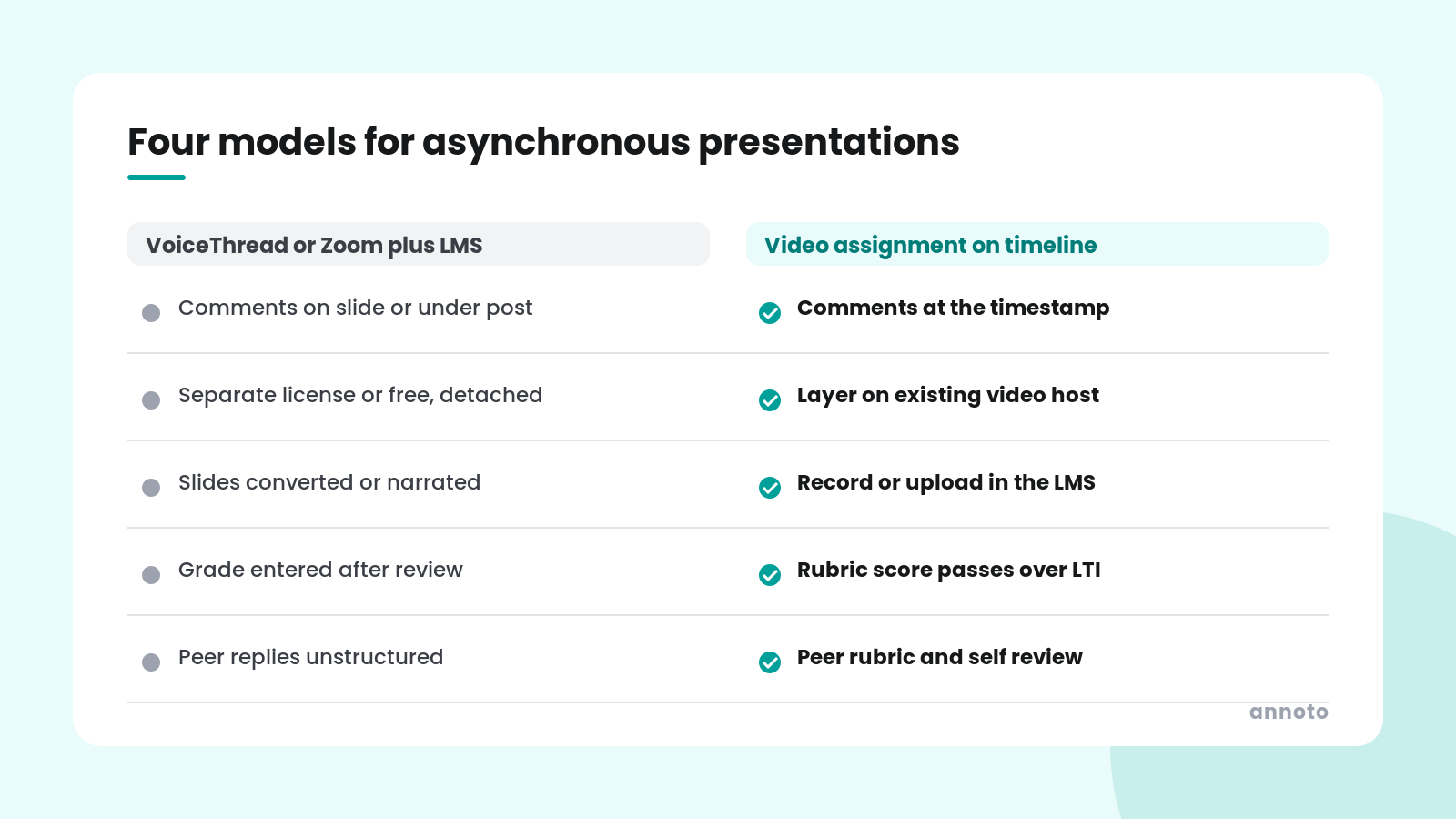
Comparing the four models
VoiceThread. Students build a VoiceThread from their slides, narrate each one in voice or video, and peers comment slide by slide in voice, video or text. Per VoiceThread's own feature list, five comment modalities and LTI into any standards compliant LMS. Strengths: spoken feedback, slide level anchoring, graded Create assignments that sync to the gradebook. Limits: a continuous recording cannot receive a comment at a moment inside it, and it is a separate license on top of the video platform you already pay for.
Zoom recording plus LMS discussion. The student records in Zoom or any screen recorder, uploads, and posts the link in a Canvas or Moodle discussion. No new tools, no cost. The weakness is the one Clarkson named: feedback is a reply under the post, and a student gets "your second section was unclear" with no way to show which second.
Campus video platform plus forum comments. Kaltura, Panopto, YuJa or Echo360 handles the recording and hosting cleanly, often from inside the LMS, and the forum handles replies. Grading is easy because the forum is native. Comments still sit beside the video rather than in it.
Video assignment with time coded feedback. The student records or uploads inside the LMS assignment, and instructor and peers leave comments at timestamps on the recording, with a rubric attached. GoReact does this with its own hosting. Annoto's video assignments do it as a layer on the institution's existing video platform, inside Canvas, Moodle or Brightspace over LTI, with self reflection, peer feedback and instructor feedback on the same timeline and the grade passing back to the gradebook. The earlier post on GoReact alternatives for video assignments compares that pair directly.
A simpler workflow
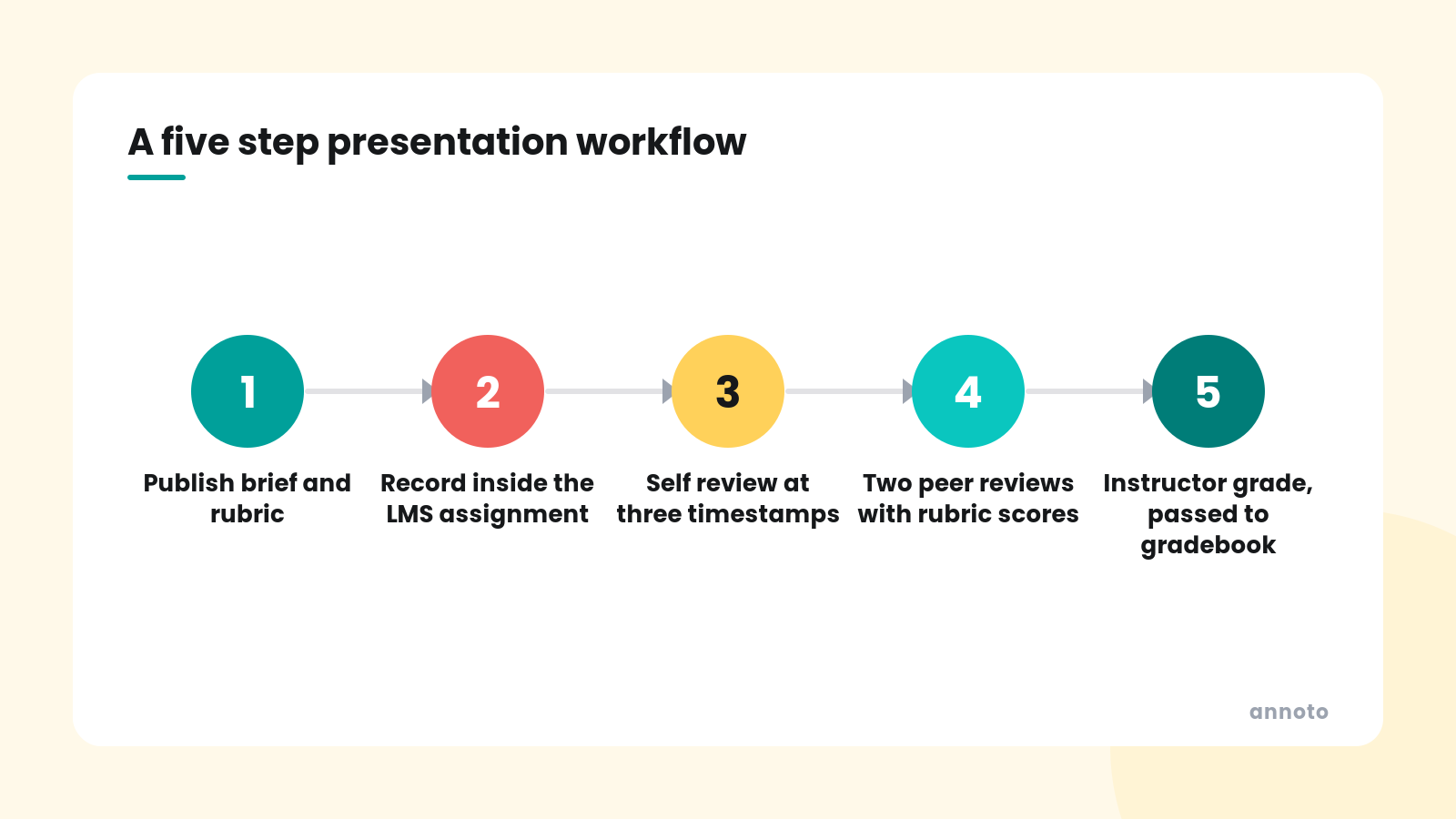
Most of the complexity comes from students moving files between tools. This workflow keeps everything on one page.
Step 1: publish the brief with the rubric. Length, audience, required elements, and the rubric below.
Step 2: record inside the assignment. Webcam, screen with slides, or an upload from a phone. No separate hosting step, no link pasting.
Step 3: self review at timestamps. The student watches back and leaves three comments on their own recording: a strength, a weakness, one change.
Step 4: peer feedback, two per student, at timestamps. Assign reviewers, each leaves at least two anchored comments and a rubric score. Annoto's peer review supports customizable rubrics and assessment criteria so the peer score is structured.
Step 5: instructor grade and feedback. You watch with the self review and peer threads visible, add your own time coded notes, score the rubric, and the grade passes to the gradebook. The post on peer review on the timeline describes a course that runs this cycle weekly.
A presentation rubric that works at timestamps
- Structure (20 percent). Clear opening, signposted sections, a close that answers the question posed.
- Content accuracy (30 percent). Claims are correct and sourced; reviewers mark any error at the second it occurs.
- Delivery (20 percent). Pace, clarity, eye contact with the camera, use of visuals.
- Audience fit (15 percent). Vocabulary and depth suit the stated audience.
- Response to feedback (15 percent). For a two round assignment, the second recording addresses the comments on the first.
"Delivery 14/20" with comments at 1:40, 4:12 and 9:55 showing the pace problems is feedback a student can act on; the number alone is not.
Where Annoto fits, and where VoiceThread or Zoom is enough
If your students present over slides without a continuous recording and you want spoken, slide by slide feedback, VoiceThread remains the better fit; nothing here changes that. For a single low stakes talk with no budget, a Zoom recording in an LMS discussion is adequate, accepting that feedback will be general. Annoto fits when presentations recur, when feedback quality matters for the grade, and when the institution already hosts video in Kaltura, Panopto or YuJa and does not want a second hosting platform or per user pricing. The Annoto vs VoiceThread comparison sets out the split.
Frequently asked questions
What is the best tool for asynchronous student presentations?
For slide based talks with spoken peer comments, VoiceThread. For single talks with no budget, a Zoom recording in an LMS discussion. For recurring presentations with rubric graded, time coded feedback inside the LMS on the existing video platform, a video assignment feature such as Annoto's.
Can students give feedback at specific moments in a presentation video?
Only in tools that anchor comments to the timeline. LMS discussion replies and most forum based options, as Clarkson notes for Echo360 in Moodle forums, attach comments to the post rather than the video. VoiceThread anchors to the slide. GoReact and Annoto anchor to the second.
How should I grade an asynchronous presentation?
Use a short published rubric, require self review and two peer reviews before the instructor grade, and give feedback at timestamps so each score is tied to evidence. If the tool passes grades to the LMS over LTI, the instructor rubric score is the only manual entry.
Takeaways
Asynchronous presentation assignments can run on VoiceThread, on a Zoom recording in an LMS discussion, on the campus video platform with forum replies, or on a video assignment feature with time coded feedback. The first three are proven and sometimes sufficient; their shared limit, in Clarkson's phrase, is that comments are not attached to the video itself. A workflow that records inside the assignment, adds self and peer review at timestamps against a published rubric, and passes the grade back over LTI removes most of the file shuffling and makes feedback specific enough to act on. If you would like to see it on your own course video, book a short demo.
