Canvas Studio Alternatives for Interactive Video in Canvas (2026)

The main alternatives to Canvas Studio, Instructure's video tool inside Canvas, for interactive video in Canvas are the hosting platforms YuJa, Panopto and Kaltura, and the engagement layer Annoto, which runs on top of any of them. Which one fits depends on whether your gap is storage and capture (a hosting platform) or quizzes, discussion and analytics (an engagement layer), and the two are not interchangeable.
This guide credits what Studio does well, sets out its documented limitations, and compares the five options on six criteria.
What Canvas Studio does well
For many courses Studio is enough. It is built into the Canvas experience, so instructors never leave the page to upload, embed, quiz or review results. Instructure's How do I create a Studio video quiz? guide shows a quiz being built in a few clicks from the media library, with multiple choice, true or false and multiple answer questions, and results posted to the Canvas gradebook afterward.
The Studio Insights page gives each media item a tab with views, total time viewed and unique viewers, two timeline graphs, and a viewer list with a completion rate per student that exports to CSV.
The University of Alberta's YuJa vs Canvas Studio comparison adds that Studio is "more closely integrated with Canvas environment," has an interactive comment system, shows analytics on the same page as the video, and currently has no storage quota. CSU Northridge's Canvas Studio vs GoReact vs Panopto page calls it "more oriented towards faculty created content" with "a richer set of tools for engagement with students, such as commenting and discussion."
Why people look for alternatives
The same two university pages document the limits, which is more useful than any vendor claim.
Captioning and editing. UAlberta rates Studio's editing and captioning as "very limited," along with weaker desktop capture and no automatic Zoom recording upload. For an accessibility office that needs corrected captions on every lecture, this alone can decide the question.
Quiz editing after publishing. Instructure's own guide states that "once a version of a quiz has been embedded or taken, it cannot be edited," that attempts cannot currently be limited even inside a limited attempts assignment, and that quizzes do not copy with course content and must be re imported each term.
Comments are flat. Studio's comment system is an advantage over YuJa, but comments are not threaded discussions with notifications, moderation, or a connection to peer review and grading.
Storage and lecture capture. CSUN notes Studio "has a storage limitation that Panopto does not," and positions Panopto as the lecture capture tool. UAlberta recommends YuJa for long term storage of large libraries.
Licensing. Instructure now describes Insights as a legacy add on available with Canvas Plus and Canvas Next, so confirm with your Canvas admin what your contract includes.
Studio, YuJa, Panopto, Kaltura and Annoto compared
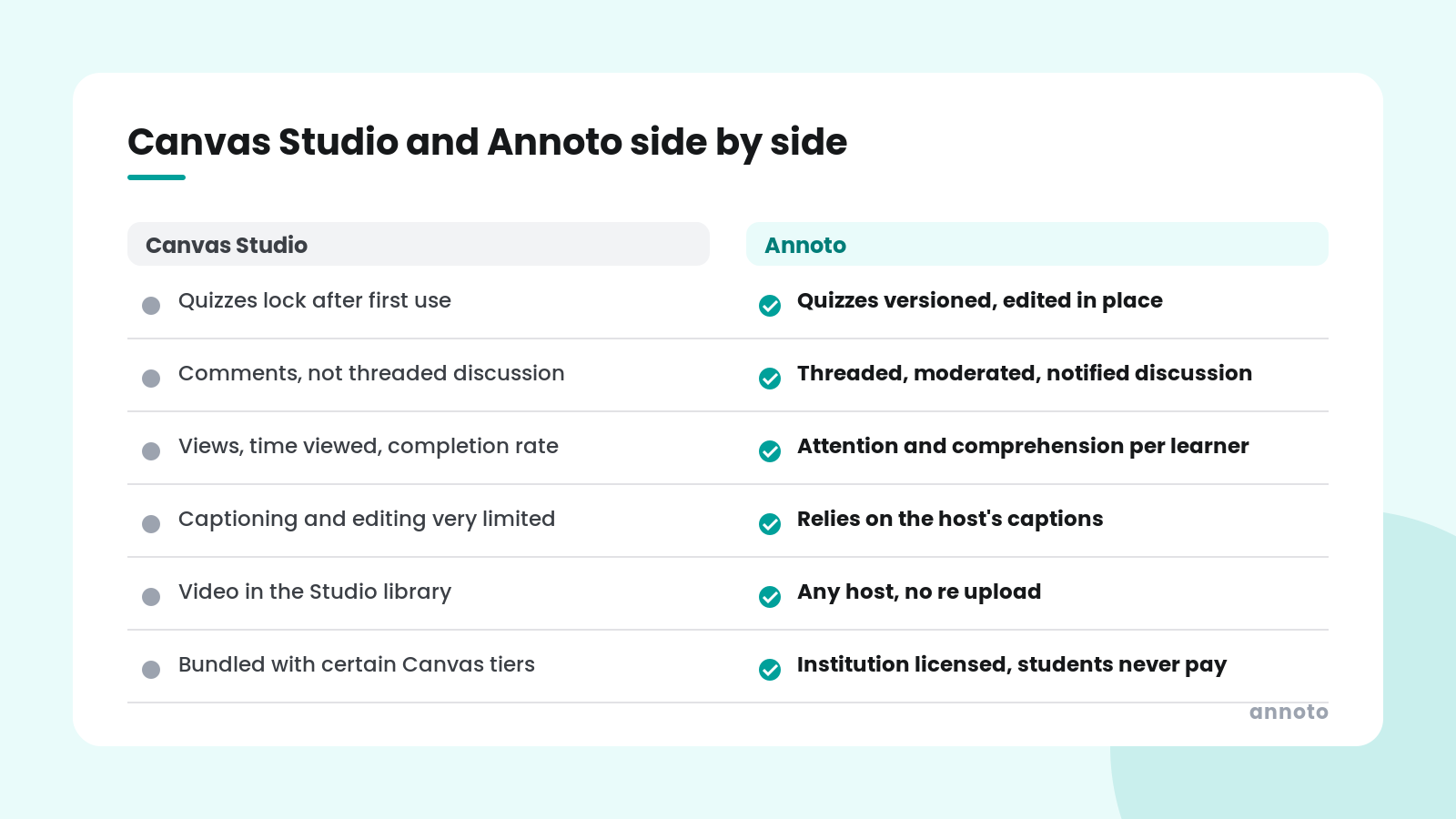
Quizzes. Studio offers multiple choice, true or false and multiple answer, locked after first use. Panopto adds multiple select and fill in the blank, with every question fixed at one point and all quizzes in a video required for a score to submit, per the University of Arizona's Add a Quiz to a Panopto Video guide. Kaltura includes open ended and reflection questions, though Utah State's Kaltura Video Quiz page notes open ended answers are auto marked correct. YuJa offers seven types including short answer and decision points. Annoto offers multiple choice and open ended questions with versioning, editing without republishing, and AI drafted questions.
Discussion. Studio has comments. YuJa has no inline student commenting per UAlberta. Panopto and Kaltura offer viewer level comments on the media page rather than threaded, timestamped discussion tied to assessment (check each vendor's current documentation for the specifics of your version). Annoto's timestamped discussion is threaded, moderated, notified and connected to peer review and reflection.
Analytics. Studio Insights, Panopto Stats and Kaltura analytics all report views, unique viewers, minutes and a per student completion figure, with CSV export. YuJa's analytics require leaving Canvas. None reports comprehension or per learner attention per segment. Annoto reports attention and comprehension separately, per learner and per moment, at user, video, course and institution level.
Captions. Studio is weakest here. YuJa, Kaltura (through REACH) and Panopto offer stronger captioning and correction workflows. Annoto does not generate captions and relies on the host's, which is an argument for keeping a capable host underneath.
Video sources. Studio, YuJa, Panopto and Kaltura each want video in their own library. Annoto works on all four plus YouTube, Vimeo, Brightcove, Wistia and HTML5, with no re upload.
Cost model. Studio is bundled with certain Canvas tiers. YuJa, Panopto and Kaltura are institution wide hosting licenses. Annoto is institution licensed as an engagement layer and students never pay; it adds to a hosting cost rather than replacing it.
Where Annoto fits
If the limitation is captions, editing, storage or lecture capture, Annoto is not the alternative you want. Pick YuJa, Panopto or Kaltura, and expect to keep Studio around for faculty created clips if your contract includes it.
If the limitation is what instructors can do with video once it is in Canvas, Annoto replaces the Studio quiz, comment and Insights layer without replacing any hosting. It registers once over LTI 1.3 as described on the interactive video quiz for Canvas page, and then runs the same graded quizzes, threaded discussion, peer review, completion tracking and per learner analytics on Studio, YuJa, Panopto or Kaltura video inside the same Canvas page, with grades passed back to the gradebook. Institutions that use more than one host get one consistent experience across all of it. The detailed comparison is on the Annoto vs Canvas Studio page, and the broader landscape is on alternatives.

Frequently asked questions
What is the best alternative to Canvas Studio?
It depends on the gap. For storage, capture and captions, YuJa, Panopto and Kaltura are the common choices, with university comparisons favoring YuJa for large libraries and Panopto for lecture capture. For quizzes, discussion and analytics inside Canvas, an engagement layer such as Annoto fills the gap on whatever host you already have.
Is Canvas Studio free with Canvas?
Studio has historically been an add on, and Instructure now lists its Insights analytics as a legacy add on included with Canvas Plus and Canvas Next. Check your institution's Canvas contract rather than assuming it is included.
Can you edit a Canvas Studio quiz after students take it?
No. Instructure's guide states that once a version of a quiz has been embedded or taken it cannot be edited. You would create a new version and re embed it. Annoto quizzes can be edited and versioned without republishing the video.
Does Canvas Studio work with YuJa or Panopto video?
Not directly; Studio quizzes and Insights apply to media in the Studio library. Annoto works on YuJa, Panopto, Kaltura and Studio video alike inside Canvas, which is the practical answer for institutions running more than one host.
Takeaways
Canvas Studio is a reasonable default for faculty created video with simple quizzes and page level analytics, and its limits are documented by the universities that use it: very limited captioning and editing, quizzes that lock after first use, flat comments and a storage cap. Hosting platforms fix the storage and caption problems. An engagement layer fixes the quiz, discussion and analytics problems on any of them, whatever sits underneath. See it on your own course video at https://www.annoto.net/demo.
