RSI, Made Practical: Documenting Regular & Substantive Interaction

Every institution offering distance education under Title IV lives with a quiet compliance obligation that rarely surfaces until an accreditor asks about it: Regular & Substantive Interaction. The rule is what legally separates a genuine distance course from a self-paced correspondence course, and getting it wrong puts financial aid eligibility at risk. The encouraging part is that the same design choices that make a course engaging are the ones that satisfy RSI, provided you capture them well.

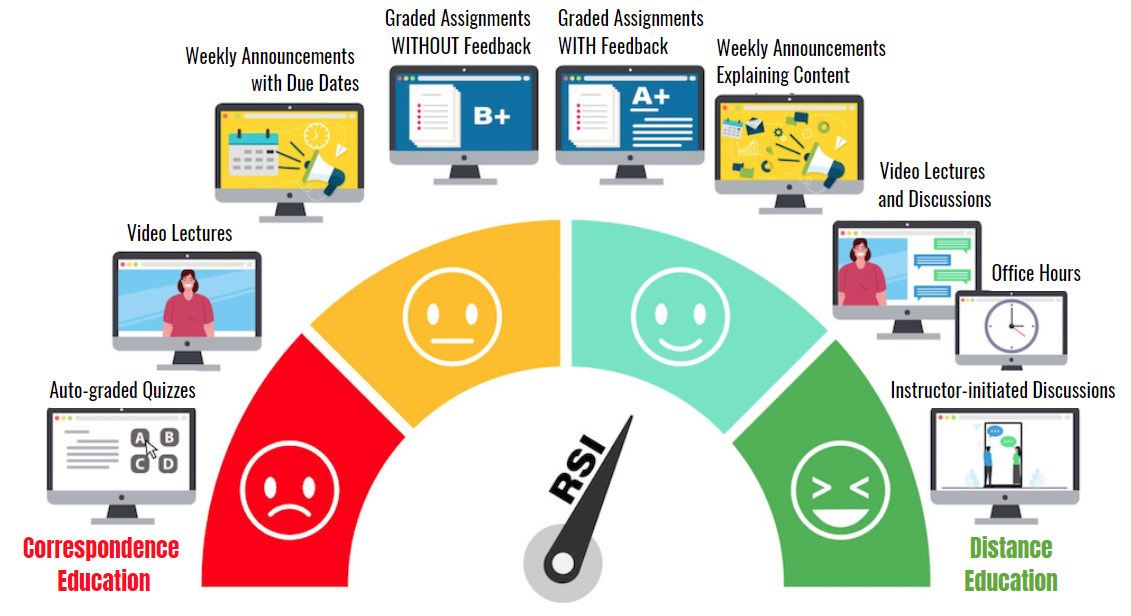
What RSI Actually Requires
The U.S. Department of Education frames the standard in two parts. Regular means interaction is predictable and scheduled, initiated by the instructor on a consistent basis rather than left to whenever a student happens to email. Substantive means the interaction is academic in nature, and a course must include at least two of these instructor-led components:
- Providing direct instruction on course content
- Assessing or providing feedback on student work
- Providing information or responding to questions about the subject
- Facilitating discussion among students around course concepts
The burden falls on the instructor to initiate. Posting a video and hoping students engage does not clear the bar; the interaction has to be authored, intentional, and documented.
How In-Video Interaction Meets the Bar
Video is where most distance learning actually happens, yet it is usually the most passive part of a course. When we let instructors author interaction directly on the timeline, that passive minute becomes substantive contact. An in-video quiz is assessment and feedback. A reflection point is direct instruction. An in-context comment thread the instructor seeds and answers is facilitated discussion. Because instructors build these deliberately and they recur across every video, they satisfy both halves of the standard at once.
RSI is not a feature you bolt on at audit time. It is a byproduct of teaching well inside the video, provided you can prove it happened.
Turning Interaction Into an Audit Trail
Satisfying RSI is only half the job; documenting it is the half that survives an accreditation review. Every interaction is timestamped and attributable: who was asked what, when the instructor responded, and how the cohort performed. That record maps cleanly to the substantive components reviewers look for, and grades flow straight to the LMS gradebook, so the evidence lives where your institution already keeps its records. When a reviewer asks how you meet RSI, the answer becomes a report you can export rather than a narrative you have to reconstruct.
We think of it simply: design the interaction once, and let the platform prove it every term.
Rolling RSI Out Across a Program
Compliance rarely fails at the level of a single course; it fails when practice varies wildly between courses. The practical move is to start with one pilot course and inventory its video content. For each video, decide which instructor-authored touchpoint it will carry: a quiz at the concept students most often misunderstand, a seeded discussion prompt at the point where opinions diverge, or a reflection point before a major transition. Set a response window the instructor commits to, because predictability is what makes interaction regular in the regulatory sense.
Once the pilot settles, turn it into a template your instructional designers can hand to faculty: a per-module pattern of interactions, a stated cadence, and a short guide on writing prompts that invite academic responses rather than one-word replies. Because the platform runs inside Canvas, Moodle, Blackboard, Brightspace, and Open edX through LTI 1.3, the same template travels with the course no matter which LMS a department uses, and grades continue to land in the gradebook without extra steps.
Finally, make evidence review a term-end habit rather than an audit-time scramble. Export the interaction analytics, check that response windows were honored, and file the report with your accreditation liaison. If reviewers later ask for more detail, the timestamped record behind the summary is already there. A ten-minute review each term is what keeps the next program review uneventful.
Keep reading
Related: One-Click LTI 1.3: Annoto Inside Canvas, Moodle, Blackboard & Brightsp, Beyond Views: A Learning Analytics Maturity Model for Video, and Weber State University: Engagement In A Political Science Course.
New to Annoto? Start with What is Annoto?, or see it inside your LMS: Canvas, Moodle, Blackboard, and Brightspace.
