Weber State University: Engagement In A Political Science Course

Political science lives and dies on discussion — debating competing theories of power, weighing trade-offs, and testing ideas against a peer’s reading of the same evidence. Weber State University’s Political Science course puts a strong emphasis on self-directed learning through a flipped-classroom model, with lectures on core concepts delivered asynchronously. To keep that model interactive and dynamic, the instructor employed Annoto, prompting students to respond to questions and to discuss with one another directly on the course videos.
At a glance
- Institution: Weber State University
- Course: Political Science
- Instructor: Janicke Stramer-Smith, Assistant Professor of Political Science
- Class size: 30
- LMS: Canvas
- Use case: Flipped Classroom
Course structure
The course is virtual-hybrid, built on the flipped-classroom method: students watch pre-recorded short video lectures and respond to pre-inserted discussion questions right on the timeline, before and between class sessions.

Annoto in the course
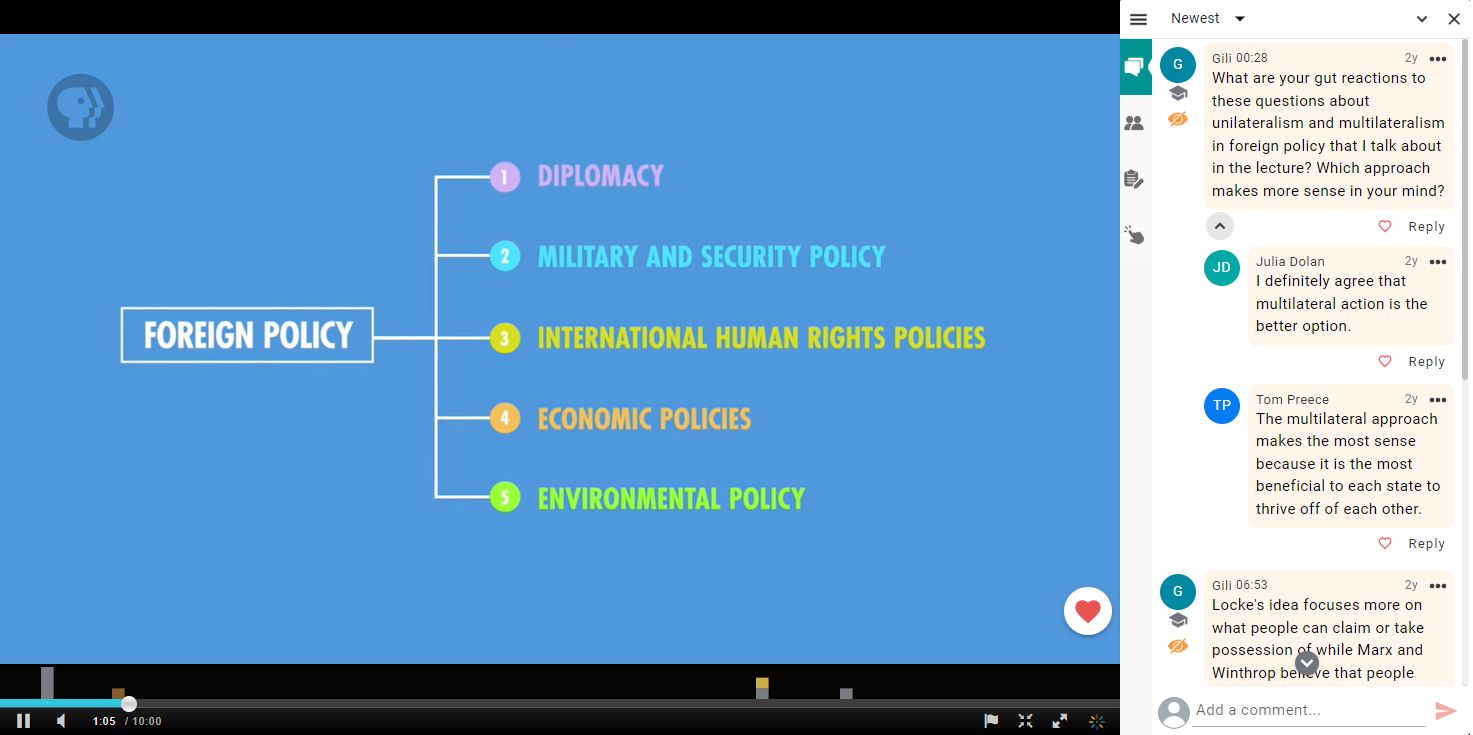
The Annoto widget gives students a place to exchange questions and ideas, respond to the instructor’s prompts, and engage in time-based video discussions with their peers — anchored to the exact moment in the lecture that sparked the thought.
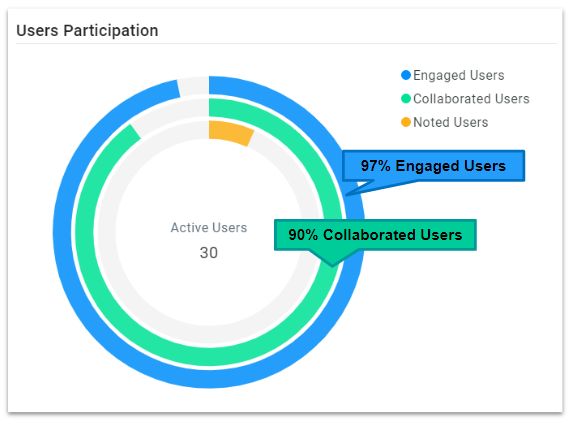
The Annoto Dashboard offers comprehensive analytics, tracking students’ active participation and assignment completion. It also surfaces where a class needs clarification or extra focus, helping the instructor optimize teaching strategies for the next session.
Class participation was extremely high
90% of course participants took an active part in the discussion — asking questions, replying to others, and sharing thoughts and insights (the collaborated users). That activity pulled even more students in to read the discussion, learn from it, and reflect on the video content: 97% of participants were engaged users.
What students said
Comments from the “Intro to Annoto” video, where the instructor requested feedback:
“I really liked using Annoto!”
“I could see other student responses to the question if something wasn’t clear to me. I also liked that I could answer the questions in real time.”
“I liked Annoto. I was definitely forced to pay more attention at times. I also liked that I was able to see thought processes of classmates and sort of learn from each other.”
“It made it easier to see the questions and listen to the lectures at the same time.”
What the instructor said

My experience with Annoto was very positive. It made managing online discussions easier. It also gave me information on how much students are engaging with the videos. It made them know that I’m actually reading their answers and questions, because I would address them in class.
— Janicke Stramer-Smith, Assistant Professor of Political Science
Takeaways for Your Own Flipped Course
The numbers here did not come from a novel format; they came from three deliberate choices any instructor can copy. First, the discussion prompts were pre-inserted at specific moments on the timeline, so students met a question exactly when the concept was fresh rather than in a separate forum hours later. Second, the prompts asked for positions, not recall — in a discipline built on argument, a question worth debating draws replies in a way a comprehension check never will. Third, the instructor closed the loop: because responses were revisited during the next class session, students knew their comments were read, and that knowledge kept the threads alive week after week.
It is also worth noticing what was not required. A thirty-student class was enough for near-total participation, so this is not a tactic reserved for large cohorts. And because Annoto ran inside Canvas over LTI, students needed no new account or tool training — the debate happened where the lectures already lived.
If you teach a discussion-driven subject, start with one lecture video, two or three timeline prompts that demand a stance, and a commitment to reference the answers in class. The dashboard will show you which moments need a follow-up before the next session.
Keep reading
Related: WashU: Practicing Every Language Skill Asynchronously, RSI, Made Practical: Documenting Regular & Substantive Interaction, and Beyond Views: A Learning Analytics Maturity Model for Video.
New to Annoto? Start with What is Annoto?, or see it inside your LMS: Canvas, Moodle, Blackboard, and Brightspace.
