Amsterdam University of the Arts: Practicing Course Material Interactively

“Annoto made the learning process much more engaging and rich.” — Melvin Crone. During the Art Criticism course at Breitner Academy (part of the Amsterdam University of the Arts), professor Melvin Crone introduced Annoto with the goal of creating a new, effective, and efficient learning process. Students were prompted to share real-time, time-tagged thoughts and insights on an interactive video, exposing them to a fun, exciting, and dynamic academic experience like never before.
At a glance
- Institution: Amsterdam University of the Arts (Breitner Academy)
- Course: Art Criticism
- Instructor: Melvin Crone
- Class size: 36
- LMS: Kaltura MediaSpace
- Use case: Collaborative Learning
Course structure
- The assignment was first given to students as homework.
- Comments were discussed and classified into categories (description, analysis, interpretation, assessment, other).
- This classification served as a guideline for the students in their art critiques/reviews.

Annoto in the course
Students were required to watch various videos on the topic of Visual Arts and to share their critiques. Annoto was applied with the goal of driving student participation — encouraging them not only to watch, but also to engage with the videos and enhance their learning experience.

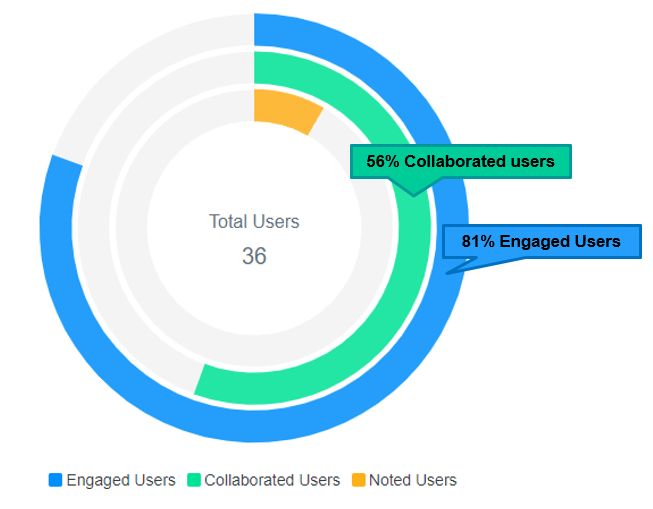
The result: 81% student engagement
56% of the students collaborated — asking questions, replying to others, and sharing thoughts and insights. Following the collaboration made by that 56%, 81% of students engaged with the video: reading the discussion, delving into the topic, and deepening their learning experience.
At a glance: Annoto time-tagged video discussion
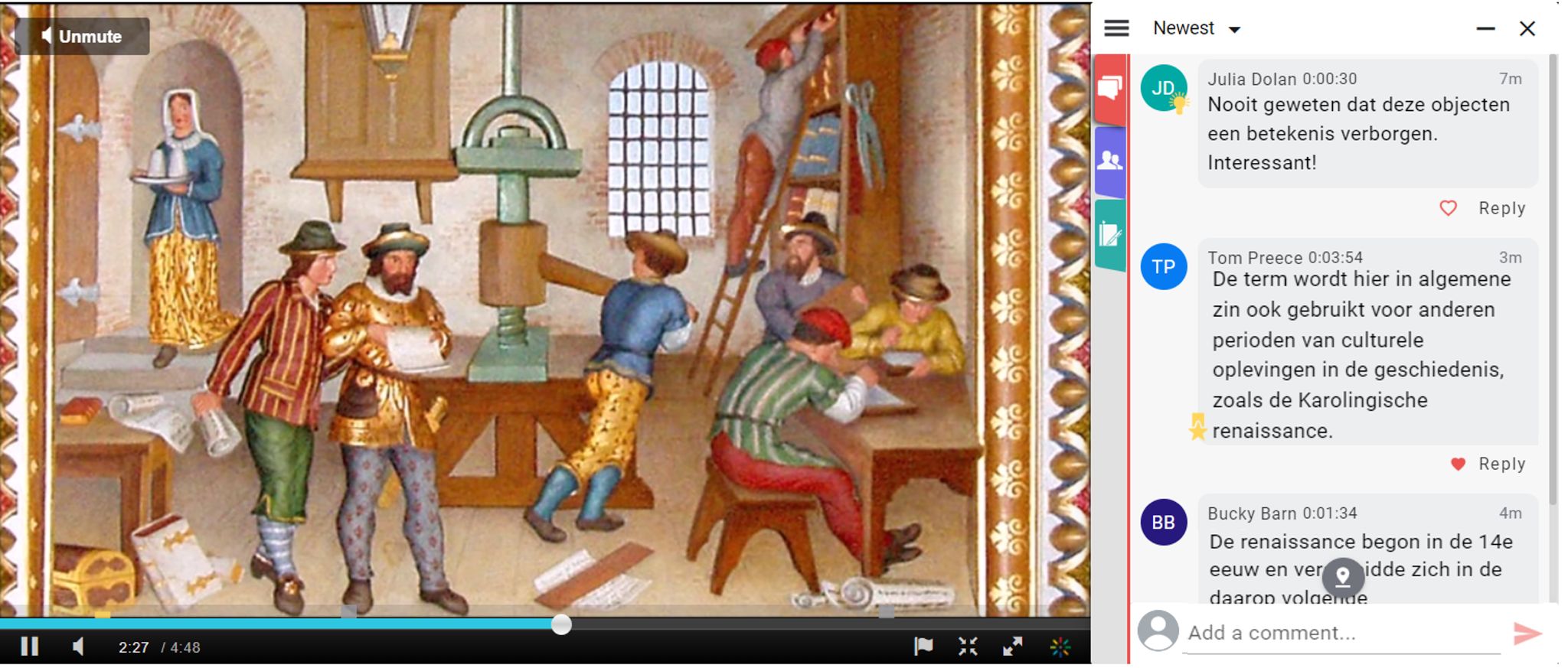
Students interacted with the video, and with each other, by adding comments on specific moments in the video — keeping their discussion professional, focused, and in-context.
What the instructor said

Using Annoto made the material less textual. There was more life in it. It enabled me to refer to concepts of art theory and art criticism based on students’ spontaneous responses. That made the material more fun and easier to cover. Annoto’s solution provides an interesting method of pedagogy. It makes the learning process much more interactive and rich.
— Melvin Crone
How to run a time-tagged critique assignment
Crone’s design holds three moves that transfer directly to other courses. The first is anchoring the act of criticism to the timeline. When a student must attach an observation to a precise second of the video, generalities become difficult to sustain; the comment has to name what is on screen at that moment and respond to it. That constraint alone raises the quality of a first written critique, in visual arts or in any discipline where students analyze performance, technique, or process.
The second move is the classification step. Sorting the class’s comments into description, analysis, interpretation, and assessment turned a raw discussion thread into a teaching instrument: students could see which register their own remarks occupied and where their critiques were thin. The same sorting exercise works for design reviews, music juries, clinical demonstrations, or teaching practicums — any field with an established critical vocabulary that novices need to internalize.
The third move is letting readers count. The numbers in this course tell a specific story: 56% of students wrote, but 81% engaged, because the written critiques became material worth reading. An instructor planning a similar assignment should expect — and value — that gap. Annoto’s analytics separate contributors from readers, so participation credit can recognize both behaviors rather than rewarding only the loudest voices.
Practically, none of this required new infrastructure. The course ran on Kaltura MediaSpace, where Annoto operates directly on the video player; the same layer works on Panopto, Wistia, YouTube, and Vimeo, and connects to institutional LMS platforms over LTI. A department that already hosts its video somewhere students can reach it has everything needed to pilot a critique assignment of this shape in a single course unit.
Keep reading
Related: University of Padova: Deepening Comprehension In Asynchronous Learning, Video Engagement Analytics 101: Measuring What Matters, and Turn Passive Video Into an Active Workspace.
New to Annoto? Start with What is Annoto?, or see it inside your LMS: Canvas, Moodle, Blackboard, and Brightspace.
