Florida State University: Creating An In-Person Feeling In Asynchronous Video

This course is housed under the Department of Human Development and Family Science (HDFS), within the College of Health and Human Sciences at Florida State University. It is open to any major and typically draws students from Clinical Professions (pre-med/nursing), Psychology, and Public Health. With Annoto, students were able to create in-context discussions that replicated an in-person class — where they could think critically, reflect, and hear the perspectives of their peers.
At a glance
- Institution: Florida State University
- Course: Human Sexuality Education
- Instructor: Dr. Cindy Wilson, Course Instructor
- Class size: 98
- LMS: Canvas
- Use case: Collaborative Learning
- Video duration: 00:02 – 1:15 hr
Before using Annoto, what did you do?
I had previously used traditional discussion boards in Canvas. Now with Annoto, I no longer use the Discussion Board function. I never felt like I got good discussion from the discussion board function I used before Annoto, and student responses were more perfunctory and less meaningful. With Annoto, the conversation feels more natural, as students can reflect and respond throughout the lecture. The conversation feels more ‘social’ in nature, much like a threaded discussion in social media, with students viewing other student comments and replying in very insightful ways.
— Dr. Wilson

Using Annoto to create a meaningful discussion
Interaction with the Annoto tool is mandatory, with points associated for viewing the lecture videos and commenting throughout the lecture. Prompts are occasionally given during the lecture that ask questions for students to reply and comment on other students’ posts. But there is freedom in how they reply, and it is intended to be more of an informal discussion and reflection on course content, much like we would’ve had in face-to-face classes. A total of 50 points will be earned by viewing the videos and discussing the content, with approximately 3 points given per chapter lecture for viewing and interacting.
— Dr. Wilson
Actionable insights from the Annoto Dashboard
The Annoto dashboard was a helpful way to read and respond to comments posted by students and to gauge students’ viewing rate of the lecture videos, their rate of comments, and completion of any review quizzes embedded throughout videos.
— Dr. Wilson
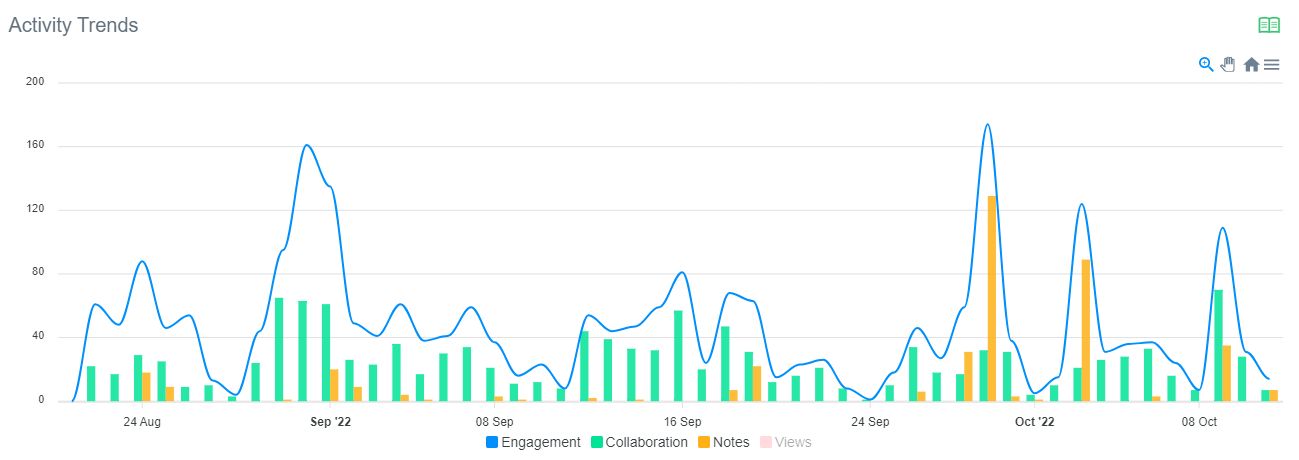
While watching the course videos, students actively engaged in the discussion throughout the semester. The in-context discussion included 1,226 comments and replies, which led to 2,310 engagement events (meaningful interactions with the content — not only writing in the discussion, but reading it as well). Once a discussion occurs, it offers benefits not only to the participants, but to additional learners as well.
What students said about the course
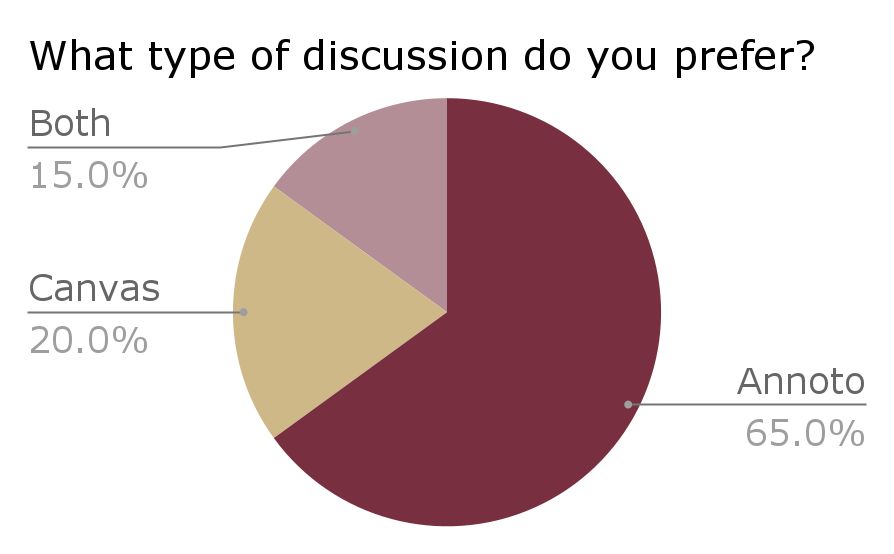
Students in the online Human Sexuality Education course completed an anonymous survey about their experience with Annoto. Asked which type of discussion they prefer, 65% preferred Annoto, 20% preferred Canvas, and 15% preferred both.
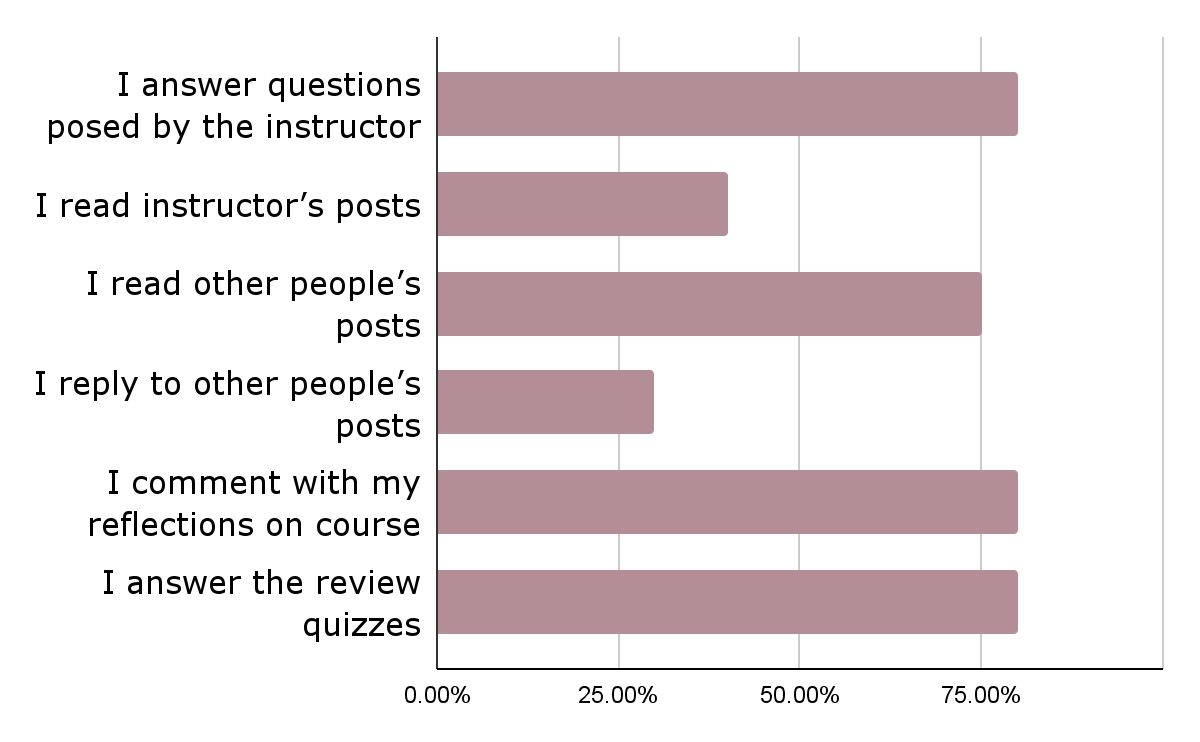
The survey also captured how students used Annoto — from answering the instructor’s questions and reading others’ posts to commenting with their own reflections and answering the review quizzes.
What students said
“Annoto helps me pay more attention to the content.”
“It keeps me engaged throughout the lecture and provides an easily accessible place for me to have my own notes.”
“Reading other students’ posts and reflecting on not only what they have to say, but also what I have to say, definitely helps my learning experience.”
“I really enjoy the post questions at the end of the lecture. It helps me quiz what I learned and what might need further reviewing after watching the lecture.”
“I love being able to respond to a prompt in the lecture and being able to reply to other students’ responses. It feels like a true discussion.”
“It helps hold yourself accountable for watching lectures.”
What the instructor said

Annoto provides students more opportunities to think critically about the course content as they reflect on the questions posted and also have the chance to hear other students’ perspectives. In an online class, Annoto accomplishes many of the same goals for discussion as in an in-person class. I highly recommend it to other instructors!
— Cindy Wilson, Course Instructor
Keep reading
Related: NYU: Saving Time While Engaging Every Student In Active Learning, ADA Title II 2027: Making Your Video Content Accessible in Time, and Active Learning at Scale: Engaging Large Cohorts Without Burning Out F.
New to Annoto? Start with What is Annoto?, or see it inside your LMS: Canvas, Moodle, Blackboard, and Brightspace.
