NYU: Saving Time While Engaging Every Student In Active Learning

“All special education courses I teach, undergrad & grad, I use Annoto.” — Mark M. Alter. Principles & Strategies for Teaching Students with Low Incidence Disabilities is part of the Special Education program in NYU’s Steinhardt School of Culture, Education and Human Development. The course combines in-person classes with extensive video materials to facilitate effective learning, and throughout the course students were required to watch videos and provide responses using Annoto.
It enabled me to efficiently and effectively engage all students and allowed me to assess engagement for ALL students.
— Mark M. Alter
At a glance
- Institution: New York University (Steinhardt School of Culture, Education and Human Development)
- Course: Principles & Strategies for Teaching Students with Low Incidence Disabilities
- Instructor: Mark M. Alter, Professor of Educational Psychology
- Class size: 21
- LMS: D2L (Brightspace)
- Use case: Collaborative Learning
Before using Annoto, what did you do?
Before using Annoto, I relied on in-class question and answer. This used up valuable class time and I never got to all students!
— Mark M. Alter
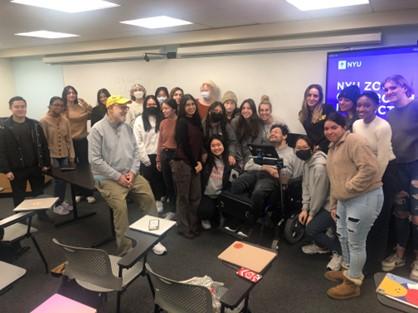
Annoto in the course
Annoto fostered meaningful discussions and stimulated active learning. Through Annoto, students were encouraged to delve into the videos, promoting reading, critical thinking, reflection, exploration, and problem-solving skills. It helped effectively address two key challenges:
- Saving precious class time — discussion happens before and after class, not during it.
- Giving ALL course participants a voice — every learner responds, not only those who speak up in class.

On the analytics side, the Annoto Dashboard let the instructor monitor students’ responses seamlessly — with a particular favorite in the “Review All Comments” feature.
Annoto Dashboard enabled me to seamlessly monitor students’ responses. I especially enjoyed the dashboard’s ‘Review All Comments’ feature.
— Mark M. Alter
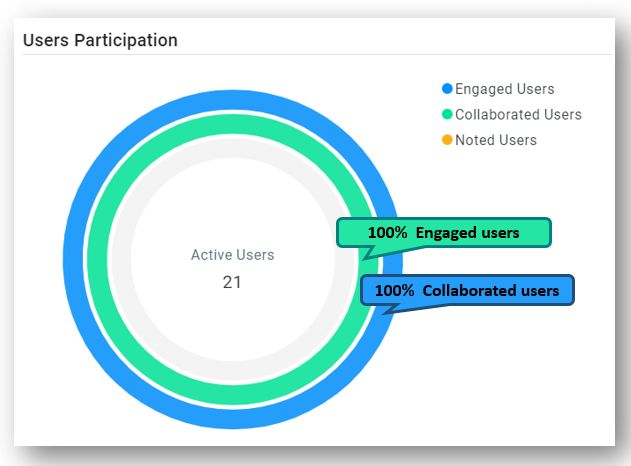
The result: 100% participation
As seen in the Users Participation graph, 100% of the course users participated — collaborating in the discussion and engaging with the videos.
What the instructor said

I am a big Annoto fan! A major requirement in all my courses is engagement of the students. I want them to read, think, reflect, explore and problem solve. I use many videos in my classes. Annoto gave me a way to engage the students by embedding a question or a comment and for ALL students to respond.
— Mark M. Alter, Professor of Educational Psychology
Takeaways for reclaiming class time
Alter’s routine is worth copying because it is small. He did not redesign his courses; he attached one question or comment to each video and made responding part of the week’s work. That single habit moved the question-and-answer cycle out of the classroom, which returned live sessions to the activities that actually need a room — modeling instructional strategies, working through cases, rehearsing what teachers-in-training will do with real students.
The equity effect deserves particular attention in a program like special education, where the course content itself is about reaching every learner. In-class discussion samples the confident few; a response embedded in the video collects an answer from each of the twenty-one enrolled students, including those who would never raise a hand. Full participation here was not a lucky cohort — it was the predictable result of an assignment structure where responding is the default rather than a performance.
The instructor-side workload is the part faculty usually ask about. Reviewing an entire class’s thinking through the dashboard’s comment review takes minutes per video, and reading responses before class means walking in already knowing which concepts landed. That preparation replaces guesswork, not adds to it. If a first round of responses comes back thin, tightening the prompt — asking students to apply a strategy rather than summarize it — usually fixes the problem by the following video.
For teams on D2L Brightspace, as this course was, the integration runs through LTI, so responses live alongside the rest of the coursework and completion can feed the gradebook. A professor who wants Alter’s result can start with next week’s video and one well-placed question.
Keep reading
Related: Georgia Tech: Guiding Questions For A Meaningful Learning Experience, RSI Compliance: How to Prove Instructor Interaction in Video Courses, and Closing the Skills Gap: Video Training Corporate L&D Can Actually Meas.
New to Annoto? Start with What is Annoto?, or see it inside your LMS: Canvas, Moodle, Blackboard, and Brightspace.
