Georgia Tech: Guiding Questions For A Meaningful Learning Experience
Georgia Tech’s Principles and Applications of Engineering Materials course created an engaging, interesting, and meaningful learning experience for its students by using Annoto to build a discussion between course participants — right on top of the lecture videos they were already watching.
At a glance
- Institution: Georgia Institute of Technology
- Course: Principles and Applications of Engineering Materials
- Instructor: Dr. Mark Losego, Associate Professor of Materials Science and Engineering
- Class size: 295
- LMS: Canvas
- Use case: Guided Watching
- Course videos: 356
- Video duration: Up to 20 minutes
Use case
Dr. Mark Losego, Associate Professor of Materials Science and Engineering at Georgia Tech, used Annoto to guide students through the course video material by adding time-based comments, questions, insights, and facts.
Course structure
The course was completely asynchronous. Students watched a set of several ~10-minute lecture videos, with “lecture sets” due twice per week plus a weekly homework assignment. The instructor included comments across the course videos to further engage students.
Class participation was very wide-scaled
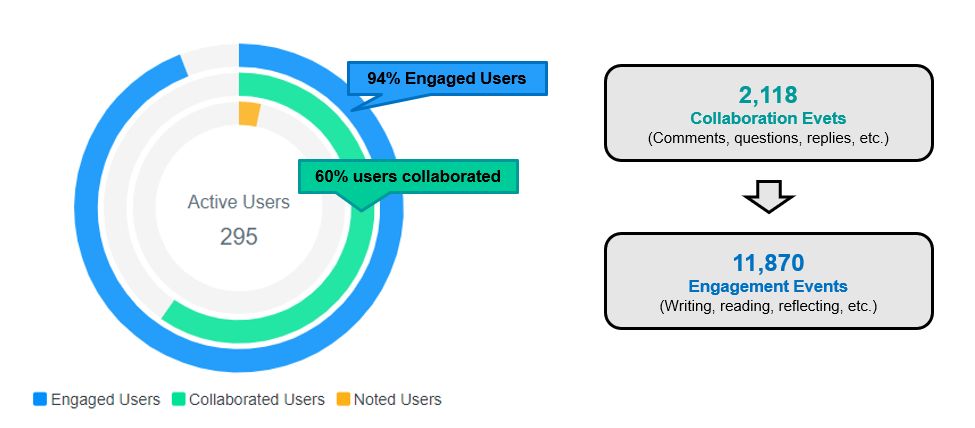
Out of 295 participants, 60% took part in the discussion throughout the semester — asking questions, replying to others, and sharing thoughts and insights. That activity drove 94% of users to get engaged in the video: to read the discussion, learn from it, and reflect on the content. In other words, once a discussion occurs, it doesn’t only benefit the students who are active in it — additional learners gain from it too.
Across the semester, the class generated 2,118 collaboration events (comments, questions, replies) and 11,870 engagement events (writing, reading, and reflecting).
What students said
“Annoto is a great way to interact with everyone on lectures.”
“The questions you pose, it helps to pin down the important things from lecture and is engaging.”
“I like the instructor comments because it makes it feel like we’re interacting with the instructor!”
“It makes the videos feel more ‘alive’.”
“I really love seeing what other people are thinking, it’s engaging and fun.”
“It’s nice to be able to read the questions and the responses; they can help to guide the lectures.”
What the instructor said

Annoto is a great tool for instructors to inject clarifying comments, added emphasis, or supporting content at time-stamped moments throughout instructional videos to further reinforce content and/or drive engagement in asynchronous courses where spontaneous interaction is otherwise difficult to achieve.
— Dr. Mark D. Losego, Associate Professor of Materials Science and Engineering
Practical takeaways for large async courses
What distinguishes this course is scale. With 295 students and 356 videos, no instructor can hold office-hours-style conversations with everyone, yet the guided-watching format let one professor be present in every lecture set. The economics are worth noting: a comment written once at a specific timestamp reaches each student at the moment it is relevant, semester after semester, which is a fundamentally better return on instructor effort than answering the same question by email dozens of times.
The course structure did quiet work here. Keeping videos to roughly ten minutes and bundling them into lecture sets due twice a week created a steady rhythm of contact with the material, and the embedded questions gave each short video an active task rather than a passive runtime. For instructors adapting the model, question density matters more than question difficulty: a prompt every few minutes keeps viewers in a responding posture throughout.
The engagement figures also show how participation compounds. Fewer than two-thirds of students wrote comments, yet nearly all engaged, because the accumulated discussion became part of the course text that every viewer read alongside the lectures. Student remarks about the videos feeling alive point to the same mechanism: presence, not polish, is what asynchronous learners miss.
The course ran inside Canvas, where Annoto connects through LTI and reports engagement per video and per student, so an instructor can verify whether the guided-watching pattern is working within the first two weeks of term.
Keep reading
Related: Gradebook Sync: Turning Engagement Into Grades Automatically, One Engagement Layer, Any LMS and Any Video Host, and AI in Teaching: What Actually Helps in 2026 (and What's Just Hype).
New to Annoto? Start with What is Annoto?, or see it inside your LMS: Canvas, Moodle, Blackboard, and Brightspace.
