Southern Utah University: Engagement In A Flight Management Systems Course

When Southern Utah University’s Flight Management Systems course was transferred from a face-to-face class to an entirely asynchronous online course, it was important for the instructor, Chris Hall, to keep students active, engaged, and interacting with one another. Using Annoto, Chris created time-based discussions between course participants — getting that exact collaborative-learning experience, without a live classroom.
At a glance
- Institution: Southern Utah University
- Course: Flight Management Systems
- Instructor: Chris Hall
- Class size: 33
- LMS: Canvas
- Use case: Collaborative Learning
Course structure
Flight Management Systems is an asynchronous online course run entirely on Canvas. Students are required to watch the videos and write in Annoto, and participation in the Annoto discussions counted for 30% of their final grade.

Annoto in the course
Students used Annoto to share insights and thoughts on the videos, as well as to ask questions, and the instructor replied to those questions — comment by comment, right where each one was raised.
Annoto instead of a standard discussion board
Chris Hall shares:
Previously I have used the standard discussion boards to talk about the case-study videos used in the class. Using an online discussion board with basic posts and replies makes it difficult to keep any kind of fluid discussion going about videos watched asynchronously. Using Annoto seems to create more realistic interaction between students.
— Chris Hall
It is much easier for students to comment about a specific point from the video while they are watching it, instead of trying to remember it for their posting after they watch the entire video. I was able to respond to each comment individually instead of as one reply after reading one longer posting made on a discussion board.
— Chris Hall

Class participation was extremely high
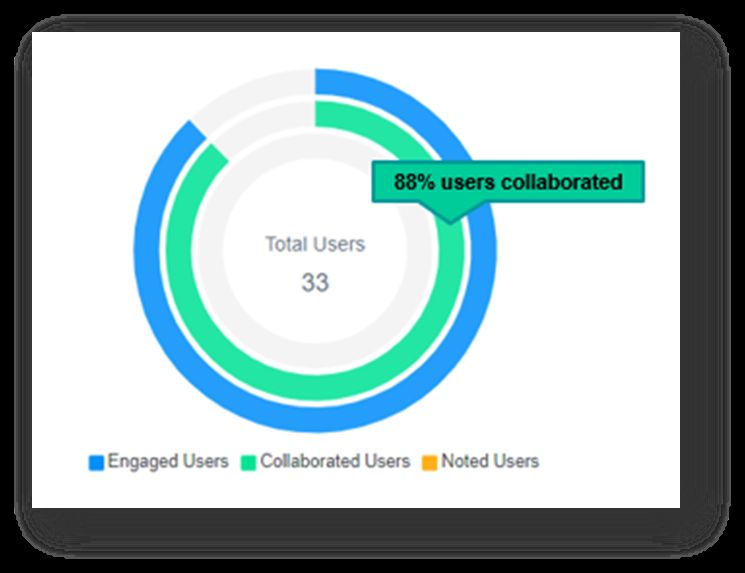
88% of the course users collaborated — writing in the shared environment. That high percentage shows how easily students can become active inside the video, instead of passively watching it.
What students said
Students answering the instructor’s question, “What do you think of the Annoto tool?”:
“I think this is a good way to watch the videos and provide thoughts and feedback at the same time.”
“I think this (Annoto) is a great idea so you can provide relevant comments as you watch the video.”
“I really like Annoto. Looking forward to using it more for future assignments.”
“It’s pretty handy and neat.”
“It was nice to be able to jot down my thoughts during the video and to have a timestamp to reference exactly what I was talking about.”
“I like it! It is presented in a simple and easy format.”
What the instructor said

I really enjoyed using the Annoto tool in my online course because of how it benefited the students and also myself. It encouraged interaction between multiple classmates by being able to respond to specific comments at specific timestamp locations from the video.
— Chris Hall
Practical takeaways for asynchronous courses
Three choices in this course are worth copying. The first is weighting: making in-video discussion a substantial share of the final grade told students the conversation was coursework, not decoration, and the participation rate followed. A comment requirement with no grade attached rarely produces the same commitment.
The second is instructor presence. Replying at the timestamp where a question was raised keeps answers in context and shows the class that someone is reading, which matters doubly in a course with no live sessions. Even brief replies signal that the channel is alive.
The third is fit between subject and format. Procedural, high-detail material rewards second-by-second discussion because the questions themselves are second-by-second: a mode selection, a readout, a decision point on the panel. Because the whole setup ran inside Canvas through the existing integration, none of it required new software for students to learn. Any technical course built on recorded demonstrations can reuse the structure as it stands.
Keep reading
Related: Weber State University: Engagement In A Political Science Course, Flipped, Async, or Blended: Annoto Fits How You Already Teach, and Spotting At-Risk Students Before Week Three.
New to Annoto? Start with What is Annoto?, or see it inside your LMS: Canvas, Moodle, Blackboard, and Brightspace.
