LMS Integration · Video Completion
Video Completion Activity
Track exactly what each learner watched, confirm when a video is fully viewed, and mark the activity complete in your LMS.
Works inside
Canvas
Moodle
Blackboard
Brightspace
Any video host
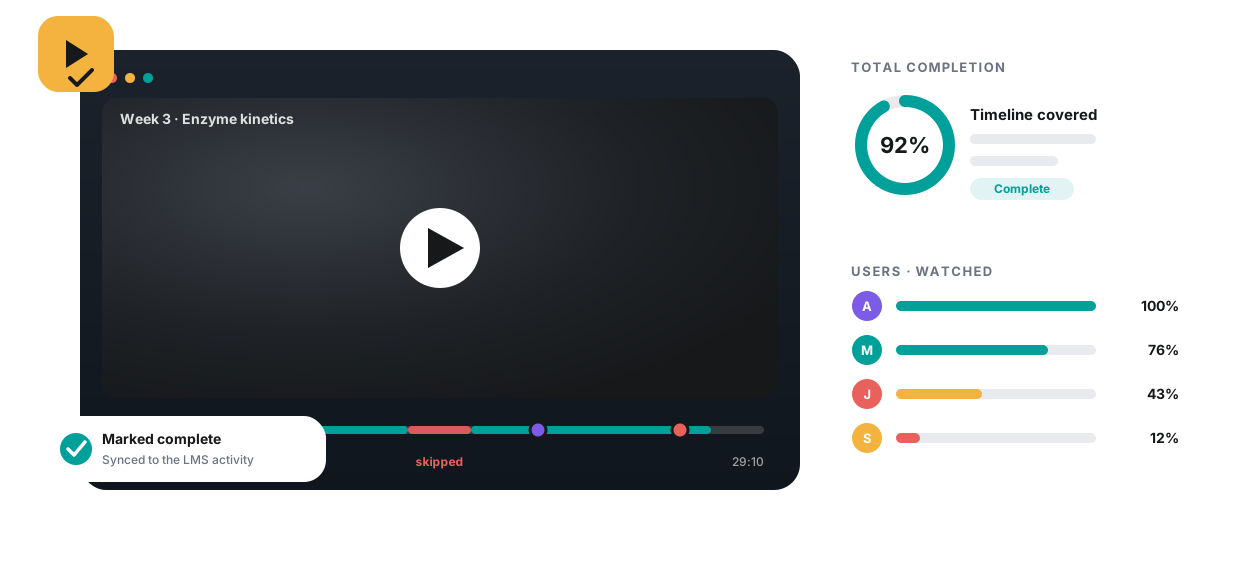
Track exactly what each learner watched, confirm when a video is fully viewed, and mark the activity complete in your LMS.
Learners skip mandatory videos, attendance is taken by hand, and nobody knows where people drop off. Your gradebook says “viewed” when the video was only opened.
Most tools stop at views. Annoto splits watching into three measures, so you can tell a learner who covered the whole video once from one who replayed the first minute five times.
How much of the timeline a learner has covered across all their viewing sessions. 100% means every second of the video was seen at least once.
The share of the video watched each time it was played, averaged across plays. A low number is a dropout signal: learners open the video and leave.
Seconds watched across every session, shown as a percentage of the video length or in seconds. Above 100% means parts of the video were watched again.
The Users table in the Annoto dashboard lists Total Completion, Average Completion Rate, Watch Time, Views and last activity for each learner. Sort any column to surface the lowest completion before the assessment, or open the Videos table to find the video where the class drops off.
Video is where most of a course's contact time now lives, and it is the part instructors see least. A play count is a record of intent: someone opened the video. It cannot say whether the explanation at minute eighteen was ever on screen. Coverage of the timeline can.
Measuring the work rather than the play also changes the conversation with learners. Feedback stops being “you did not watch” and becomes “you stopped before the worked example, and that is what the quiz tests.”
It changes what instructors fix, too. When a whole cohort's average completion rate collapses on one video, the video is the problem: too long, badly placed, or unclear about why it matters. When one learner's completion trails the class on every video, that learner needs a conversation. Annoto keeps the two cases apart instead of blending them into a single engagement score.
Total Completion aggregates every viewing session against the timeline, so a learner who resumed the video twice is credited for what they saw, and a learner who skipped ahead is not credited for the part they jumped over.
Average Completion Rate shows how much of a video is watched each time it is opened. Sort the Videos table by it and the weak point in your sequence stands out, before you redesign a whole module around a guess.
Sort the Users table by Total Completion at the end of each week. The names at the bottom are the outreach list, and the numbers next to them make the message concrete instead of generic.
Pair it with Video Activity Completion and a watch threshold becomes an LMS activity requirement, with progress shown in the same player. Learners know what finished means, and so does the gradebook.
Measurement happens in the player, reporting happens in the Annoto dashboard, and grading, when you want it, happens in the LMS gradebook.
Total Completion aggregates every viewing session against the timeline, so resuming and re-watching count once and skipped stretches never count.
Average Completion Rate is the share of the video watched each time it is played. Low numbers mean learners open the video and leave early.
Seconds watched across every session, shown as a percentage of the video length or in seconds. Above 100% means parts were watched again.
The Videos table ranks your videos, the Users table ranks your learners, and each learner's overview opens a completion funnel from views to total completion.
Every table sorts by any column, so the least-watched video or the learners with the lowest completion are one click away.
Video Activity Completion turns a watch threshold, or participation in comments and quizzes, into an LMS completion and a gradebook entry, with pass-back on Assignments, Discussions and Pages.
See Completion & GradebookVideo activity completion reports are generated automatically, and the course Users table exports as CSV for grading, advising or your own reporting stack.
Enable only analytics on a video and the discussion widget stays hidden, while the dashboard still reports users, views and completion for it.
Annoto tracks the exact percentage watched, per learner, per video.
You set a completion threshold that marks the activity done.
Confirmation flows to your LMS gradebook automatically.
Combine with quizzes and reflection points as one graded activity.
Mandatory lectures, compliance training, and onboarding: anywhere you need an audit trail that the content was actually watched, not just opened.
The course Overview shows how the cohort watches. Open a learner and you get a completion funnel, from views to watched time to watched videos to total completion, next to the same three metrics for that person alone. Here is how to read them, using the example values from the Annoto documentation.
Annoto measures completion on any video you can embed and reports it inside your LMS through LTI 1.3. No separate portal for learners, no second login for instructors.
Book a demo and watch a video activity go from watched to marked complete in your own gradebook.